
HomeNewsExhibitsYo-YosMemorabiliaRelated Skill ToysArtProfiles & HistoryPatents & ResourcesMessage BoardAbout UssupportOneDropDuncanYoYoExpert


Enter
Sponsors and Curators
The Museum of Yo-Yo History is a labor of love, and we would not be able to stay up-to-date with exhibits without the support of our sponsors and curators. Big thanks go to One Drop Design and Duncan for supplying us with their latest models, YoYoExpert for their help and support, and to Cody Orr, TotalArtist and YoYoBrothers™ for allowing us to use their collections!

If you're a manufacturer, or just a big collector and you want to help support the Museum drop me at line at chimera@yoyomuseum.com
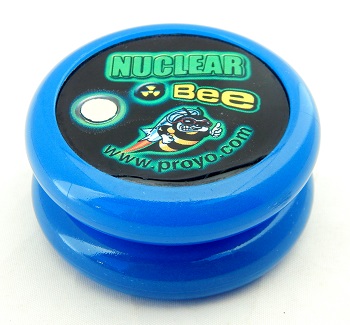
Playmaxx/ProYo Turbo Nuclear Bee (glow)
Exhibit #3677
TypeSpecial Release
ShapeModified
AxleBearing
PackagingNone
ConstructionMulti-piece plastic
ResponseBrake Pad
GapFixed
Condition9
Number Produced200
Date1999
To2000
OwnerRick Brough
Compare

The Nuclear Bee was a ProYo Turbo Bumble Bee made in a special and very limited glow-in-the-dark release. The bluish glowing yo-yo halves were actually made based on a test run Playmaxx was doing for what would ultimately be the regular production release of the glow-in-the-dark Proyos. In this case, the test was done in a Turbo Bumble Bee mold. Supposedly, around 200 Turbo Nuclear Bees were made but that number varies among collectors. The side cap design on both halves had a glow-in-the-dark dot as part of the logo. This model is fairly hard to find nowadays. An important note about this yo-yo: It was never sold by Playmaxx in a plastic Turbo Bumble Bee case. The yo-yo was sold without packaging of any kind. So buyer beware.

Rim weight with a ball bearing transaxle. The yo-yo used the "BPT" (Brake Pad Technology) response system. Did not come boxed or packaged; it was sold loose.

Original retail price for the Turbo Bumble Bee was $30 US. Because the Turbo Nuclear Bee was a limited special release, it likely retailed in the $35-$40 range.

To see all glow in the dark yo-yos in this museum, in the left panel, click Exhibits.
In the right pane, in the Name/Model field, type glow, then click Browse.
Other Views
Profile
Side, angled, large
Face, large
Internals

compare
2005-2026 Software © David W. Hall
Content by David W. Hall & Rick Brough